기본적인 세팅은 마쳤으니 이제 웹 페이지를 띄우고 데이터를 보여주고 갖고 오는 것을 하려한다.
먼저 게시판에 필요한 로그인 및 회원가입 기능을 구현할 것이다.
1. DTO
먼저 DB 관련해서 클래스를 하나 만든다.
위치는 domain에 user라는 자바 클래스를 만들었다.
package com.blog.domain;

import lombok.*;
import lombok.extern.log4j.Log4j2;

import java.time.LocalDateTime;

@Log4j2
@Getter
@Setter
@ToString
@Builder
@NoArgsConstructor
@AllArgsConstructor
public class User {
    private Integer no;
    private Integer level;
    private String name;
    private String id;
    private String password;
    private LocalDateTime RegisteredDate;
    private String phone;
    private String email;
    private String profileImage;
}
2. HTML
칼럼은 이정도로만 만들었고 이제 회원가입과 로그인 페이지를 만들어서 보여주는 역할을 할 것이다.
각 페이지의 경로는 template/user 만들었다.
css는 생략하였고 간단하게 만들었다.
회원가입 페이지
<!DOCTYPE html>
<html lang="ko"
    xmlns:th="http://www.thymeleaf.org"
    xmlns:sec="http://www.thymeleaf.org/extras/spring-security"
      xmlns:layout="http://www.ultraq.net.nz/thymeleaf/layout"
     >
      <head>
  <meta charset="UTF-8">
  <title>Title</title>
</head>
<body>
<header>

</header>
<main>
    <form action="" method="POST" enctype="multipart/form-data">
        이름 : <label for="name"><input type="text" id="name" name="name"></label>
        아이디 : <label for="id"><input type="text" id="id" name="id"></label>
        비밀번호 : <label for="password"><input type="text" id="password" name="password"></label>
        휴대폰 번호 : <label for="phone"><input type="text" id="phone" name="phone"></label>
        이메일 : <label for="email"><input type="text" id="email" name="email"></label>
        프로필 이미지 : <label for="profileImage"><input type="text" id="profileImage" name="profileImage"></label>

        <button type="submit">회원가입하기</button>
        <button type="submit">취소하기</button>
    </form>
</main>
<footer>

</footer>
</body>
</html>
3.MySql
그리고 mysql workbench를 통해 DTO에 맞게 테이블을 만들면 된다.
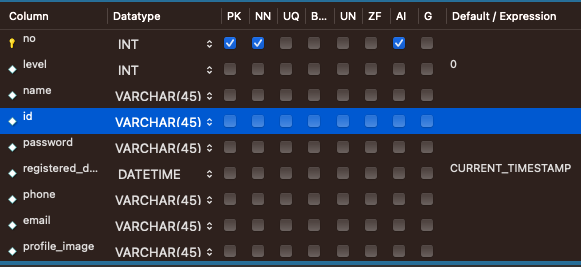
4. Mapper
이제 매퍼 인터페이스를 작성 후 xml 에 적용 되도록 하면 서비스와 컨트롤러만 다루면 된다.
다음과 같이 인터페이스를 작성하고
package com.blog.mapper.user;


import com.blog.domain.User;
import org.apache.ibatis.annotations.Mapper;

@Mapper
public interface UserMapper {
    void insertUser(User user);
}
xml에 다음과 같이 입력하여 매핑을 시켜주었다.
values 안에 #{} 값은 html의 name의 값을 보고 찾아서 만약 input의 name 이 id라면 id 에 넣는 값들을 매핑시켜 데이터베이스에 넣어준다. 그리고 Auto_increment의 경우는 NULL 그 외 디폴트로 설정하였다.
<mapper namespace="com.blog.mapper.user.UserMapper">
    <insert id="insertUser">
insert into `user` (no, level, name, id, password, registered_date,phone,email,profile_image)
values(NULL,DEFAULT,#{name},#{id},#{password},DEFAULT,#{phone},#{email},#{profileImage});
    </insert>
</mapper>
5.Service
이제 서비스를 작성해보자
서비스는 다음과 같이 간단히 작성할 수 있었다.
package com.blog.service.user;

import com.blog.domain.User;
import com.blog.mapper.user.UserMapper;
import lombok.extern.log4j.Log4j2;
import org.springframework.beans.factory.annotation.Autowired;
import org.springframework.stereotype.Service;

@Service
@Log4j2
public class UserService {
    @Autowired
    private UserMapper userMapper;
    public void insertUser(User user) {
        userMapper.insertUser(user);
    }
}
6. Controller
그리고 마지막으로 컨트롤러를 작성해보면
package com.blog.controller.user;

import com.blog.domain.User;
import com.blog.service.user.UserService;
import lombok.Getter;
import lombok.extern.log4j.Log4j2;
import org.springframework.beans.factory.annotation.Autowired;
import org.springframework.stereotype.Controller;
import org.springframework.web.bind.annotation.GetMapping;
import org.springframework.web.bind.annotation.PostMapping;
import org.springframework.web.bind.annotation.RequestMapping;

@Controller
@RequestMapping("/user") // 앞에 추가적으로 경로 설정
@Log4j2
public class UserController {
    @Autowired
    private UserService userService;

    // 회원가입 화면을 보여줌
    @GetMapping("/register")
    public void get_register() {

    }

    // 로그인 화면을 보여줌
    @GetMapping("/login")
    public void get_login() {

    }

    // 사용자가 입력한 회원가입 데이터를 받아옴
    @PostMapping("/register")
    public String post_register(User user) {
        log.info("user : " + user);
        userService.insertUser(user);
        return "redirect:/user/login"; // 성공 시 로그인 경로로 바로 이동
    }


}
GetMapping은 웹 페이지를 볼 수 있도록 띄워주는 역할을 하고
PostMapping은 웹 페이지의 데이터를 우리가 받을 수 있도록 해준다.
그리고 이렇게 실행을 시켜보면 분명 에러가 발생할 것이다.
처음에 넣은 Dependencies 중에 Security를 넣었기 때문에 Configuration을 설정하지 않으면 어떤 경로도 접근할 수 없게 된다.
그래서 Security에 관련된 Config파일을 추가해주었다.
package com.blog.config;

import lombok.extern.log4j.Log4j2;
import org.springframework.boot.autoconfigure.security.servlet.PathRequest;
import org.springframework.context.annotation.Bean;
import org.springframework.context.annotation.Configuration;
import org.springframework.security.config.annotation.web.builders.HttpSecurity;
import org.springframework.security.config.annotation.web.configuration.EnableWebSecurity;
import org.springframework.security.config.annotation.web.configuration.WebSecurityCustomizer;
import org.springframework.security.web.SecurityFilterChain;

@Configuration
@EnableWebSecurity
@Log4j2
public class SecurityConfig {
    @Bean
    SecurityFilterChain securityFilterChain(HttpSecurity http) throws Exception {
        // csrf 보호 비활성화
        http.csrf(csrf -> csrf.disable());

        // 폼 로그인에 대한 설정
        http.formLogin(config -> {
            config.loginPage("/user/login")
                            .usernameParameter("id")
                                    .defaultSuccessUrl("/main");
        });

        // 요청 권한 설정 모든 요청에 대한 허용
        http.authorizeHttpRequests(config -> {
            config.anyRequest().permitAll();
        });
        return http.build();
    }

//    정적 메소드에 대한 보안 무시 스태틱이나 템플릿에 있는 파일 등을 무시한다.
    @Bean
    public WebSecurityCustomizer webSecurityCustomizer(){
        return web -> web.ignoring().requestMatchers(PathRequest.toStaticResources().atCommonLocations());
    }
}
이러한 세팅들을 마쳤으면 실행시켜서 데이터가 정상적으로 들어오는지 확인해보자



데이터가 정상적으로 들어오는 것을 확인할 수 있다.
이 다음으론 HTML 및 CSS를 서버에 넘기기 좋게 수정하도록 하겠다.
'웹 페이지 개발' 카테고리의 다른 글
| 3. 웹 페이지 HTML Fragment (0) | 2024.07.14 |
|---|---|
| 1. 스프링 부트 프로젝트 생성 (0) | 2024.06.24 |